The free MD file editor for Windows. Built for the prompt era.
Open any .md file in 200 ms with split-view live preview. CLAUDE.md, AGENTS.md, system prompts, RAG context, READMEs, notes, journals - DotMD treats every flavor of Markdown as first-class, with a live token meter for Claude, GPT, and Gemini as you type. Free, no login, no telemetry, no subscription.
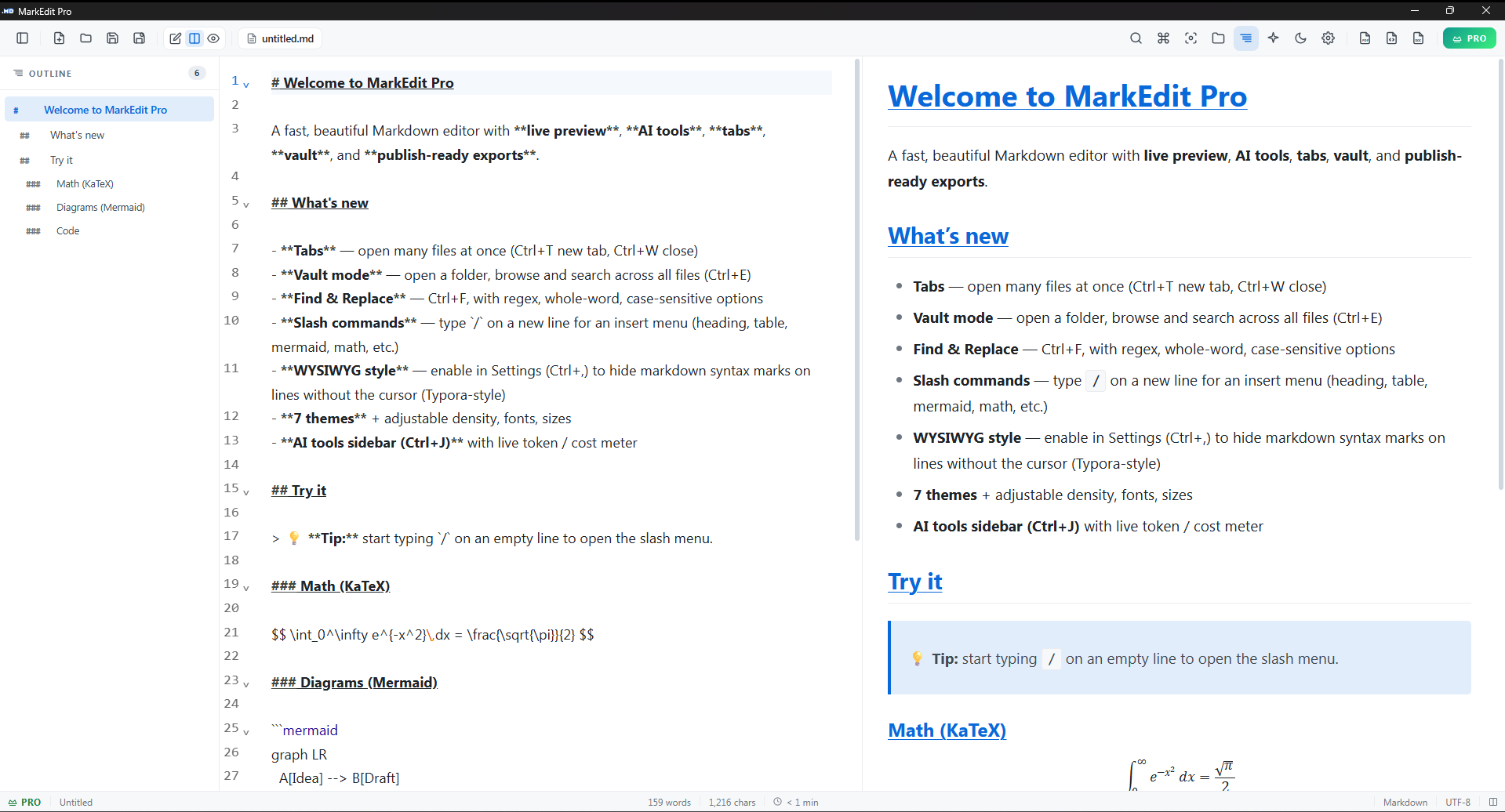
If you live in .md files, this is for you.
Six kinds of people open DotMD every day. See yourself in any of these? Download is free, takes 30 seconds.
You ship system prompts for a living
You're tuning CLAUDE.md, AGENTS.md, OpenAI system messages, or RAG context files. You need to see token counts as you cut, not after. DotMD's local token meter for Claude, GPT, and Gemini means you fit the context window before you ship.
You write READMEs, docs, and changelogs
Every repo you touch has a README.md, every release has a CHANGELOG.md, every internal tool needs an ARCHITECTURE.md. DotMD gives you GitHub-flavored preview so what you commit is what your team reads.
You're building on top of LLMs
Agent frameworks, RAG pipelines, fine-tuning datasets, eval suites. All of it is Markdown under the hood. DotMD's vault mode turns your prompts/ folder into a searchable, browsable library.
You publish to GitHub Pages, Hugo, Jekyll, MkDocs
Your blog or docs site eats Markdown for breakfast. Write in DotMD with live preview, KaTeX for math, Mermaid for diagrams, syntax-highlighted code. Commit. Done.
You take notes that should outlive every app
Lecture notes, paper drafts, lab journals, reading lists. Markdown is plain text, version-controllable, future-proof, AI-readable. DotMD's vault mode is your second brain that you actually own.
You opened this page because Notepad opened your .md file
You just want a fast, light, native Markdown editor that doesn't beg you to sign in, doesn't sync to a cloud you didn't ask for, doesn't bundle 200 MB of Chromium. DotMD is 6.8 MB, opens in 200 ms, and respects that.
The fastest way to open MD files on Windows.
An .md file is a Markdown file - plain text with a tiny syntax for headings, lists, links, code, and tables. Used by GitHub READMEs, AI prompt libraries (CLAUDE.md, AGENTS.md), notes apps like Obsidian and Bear (exports), Hugo and Jekyll blogs, and almost every static site generator. Windows doesn't ship with a Markdown editor, so by default a .md file opens as raw text in Notepad and looks unreadable. DotMD fixes that in 30 seconds.
Download the installer (6.8 MB)
Click Download for Windows. The installer is 6.8 MB, no bundled extras. Works on Windows 10 and Windows 11, 64-bit.
Run the installer
Double-click the downloaded .exe. Windows SmartScreen may warn about unknown publisher (we're working on code signing), click "More info" then "Run anyway" to install.
Open any .md file
Double-click any .md file in File Explorer. DotMD registers itself as the default .md handler during install, so it opens instantly with split-view live preview, syntax highlighting, and your chosen theme.
Set it as default (if not already)
If Windows didn't pick DotMD automatically: right-click any .md file → "Open with" → "Choose another app" → select DotMD → check "Always use this app". Done forever.
Made for the AI era. Free for everyone.
Token meter for Claude, GPT, and Gemini. Live preview, vault search, slash commands, themes, file association. Designed for people who edit .md files all day, whether they're shipping a README or tuning a system prompt.
Live token meter for LLMs
See the exact token count for Claude, GPT, and Gemini as you type. Also estimates cost at current API rates. Tune long system prompts down to the token. No more pasting into a tokenizer tab.
Ctrl+JLive preview, split view
Edit on the left, see the rendered Markdown update on the right as you type. Toggle to editor-only or preview-only with one shortcut. GitHub-style rendering, so your README looks the way it'll look on GitHub.
Ctrl+\Syntax highlighting
Code blocks render with language-aware colors. KaTeX renders inline and block math. Mermaid renders diagrams from text.
Prompt library mode
Point DotMD at your prompts/ folder or your repo with CLAUDE.md and AGENTS.md in it. Browse from the sidebar, full-text search across every prompt, open results in tabs.
Slash commands
Type / on a blank line to insert headings, tables, code blocks, math, Mermaid diagrams, task lists. Faster than remembering syntax.
Themes and density
7 themes, adjustable font size, line height, and editor density. Settings persist across launches. Pick what your eyes like.
Default .md handler
Double-click CLAUDE.md, AGENTS.md, or any .md file in Explorer, it opens in DotMD instantly. No more "open with Notepad" embarrassment when an agent tries to read your context file.
Free vs Pro
Everything above is free, forever. Pro is for people who export to PDF or DOCX every day, or want the watermark off.
Free
- Full editor, no nag screens
- Unlimited HTML export
- 1 PDF export per day
- 1 DOCX export per day
- Themes, tabs, vault, slash commands
- Default
.mdhandler - Small watermark on exports
Pro
- Everything in Free
- Unlimited PDF export
- Unlimited DOCX export
- No watermark anywhere
- One-time payment, lifetime license
- 2 machines per license
- Priority email support
Prompts, context files, READMEs. One editor.
Markdown stopped being just a README format the day every AI tool started reading it. Your CLAUDE.md, your AGENTS.md, your system prompts, your RAG context, your agent instructions, your repo's README, your daily notes - they're all just .md. DotMD treats every flavor as first-class.
Tune system prompts with a token budget
Editing the system prompt for an agent or RAG pipeline? Watch the live token meter for Claude, GPT, and Gemini as you cut and rewrite. Fit your prompt inside the context window before you ship, not after the bill arrives.
Keep CLAUDE.md and AGENTS.md in sync
Double-click your repo's CLAUDE.md, edit instructions for your AI coding agent, save. DotMD watches the file on disk, so if Claude Code rewrites the file mid-session, your editor reflects the change without missing a beat.
READMEs that look right on GitHub
Edit on the left, see the GitHub-style preview on the right. Tables, code fences, task lists rendered the way GitHub renders them. Commit your README with confidence, no more "let me push and check on github.com".
A prompt library you can actually navigate
Point DotMD at your prompts/ folder. Browse from the sidebar, full-text search across every prompt you've ever written, open three at once in tabs to compare. Version-controllable, future-proof, no vendor lock.
Notes, drafts, journals
Plain text, in a folder, in Git. Your notes outlive every notes app's pivot. Open the folder as a vault, search across everything, write in WYSIWYG or raw Markdown - your choice.
Docs, specs, RFCs with math and diagrams
Write the doc in Markdown, render KaTeX for equations, Mermaid for sequence and flow diagrams, syntax-highlighted code for snippets. Export to HTML for sharing - no PowerPoint required.
Built for the prompt era. Free for everyone.
6.8 MB. 200 ms cold start. Live token meter for Claude, GPT, and Gemini. No login, no telemetry, no nag. Just a fast native Windows app for every .md file you write, from CLAUDE.md to your daily journal.
Questions people ask before downloading
- Is it really free?
- Yes. The full editor, live preview, themes, tabs, vault, slash commands, file association, HTML export are all free with no time limit and no signup. Pro only changes PDF/DOCX export limits and removes the small export watermark.
- Why is there a Pro version at all?
- So we can keep building this for a long time. The free tier covers 95% of what people need, the ₹250 Pro unlocks unlimited PDF/DOCX export and removes the export watermark. One-time payment, lifetime license. No subscription.
- Does it work offline?
- Completely. No internet required to install or run. DotMD never phones home, doesn't telemetry, doesn't track anything.
- Will it open my existing
.mdfiles? - Yes. Any
.md,.markdown,.mdown,.mkd,.mkdnfile. After install, you can set DotMD as the default app in Settings → Apps → Default apps. - Does the token meter actually call OpenAI / Anthropic?
- No. Counts are computed locally with the same tokenizers (tiktoken for GPT, claude-tokenizer for Claude, custom for Gemini). Zero network calls, your prompt never leaves the machine. Cost estimates use a static rate table that you can update in Settings.
- Why "Unknown publisher" during install?
- The installer isn't code-signed yet, so Windows SmartScreen warns about it. Click "More info" then "Run anyway" to install. We're working on getting a code-signing certificate so this warning goes away.
- What OS does it support?
- Windows 10 and Windows 11, 64-bit. No macOS or Linux build yet.
- Where are my files saved?
- Wherever you save them, locally. DotMD doesn't move, copy, or sync your files. Settings live in
%APPDATA%\dotmd-pro. - Can I use it for commercial work?
- Yes, both Free and Pro can be used for any purpose, commercial or personal. No restrictions on what you write in DotMD.